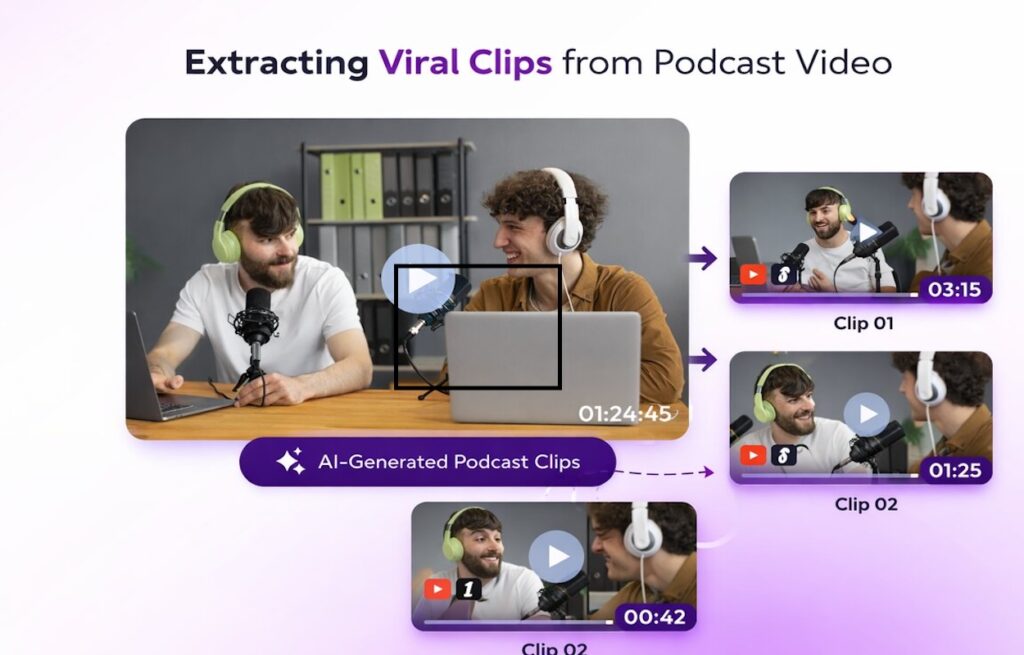
Podcasts are fast becoming one of the most widely consumed content formats. People are liking the idea of artists, experts, and celebrities opening up about their lives and worldviews in such detail. Clearly, there are incredible opportunities for podcasters to shine in this arena. But what more can be done to widen the reach of podcasts? If you are a podcaster, this blog will give you a helpful overview of how you can repurpose podcast episodes using AI for better reach and visibility using viral podcast clips.
Snipin AI Podcast Clips: A Great Reach Maximizer
Before we talk about what Snipin AI is or does, let’s understand why podcast clips are a fantastic idea in the first place:
Podcast clips are short bits taken right out of your longer shows. They give listeners a quick idea of what you’re about and are great for sharing on social media like Instagram, LinkedIn, Twitter, and Facebook.
These clips don’t just preview your stuff. They’re like little invites that get people wanting to hear the whole thing. Whether it’s a really interesting point, a funny moment, something weird, or a good story, these clips grab people’s attention and make them curious. They’re made to stop people from scrolling, turning them into regular listeners who want to hear the whole show.
Typical podcast clips are short videos with captions, audio bits, animated waveforms that show the sound, and quote cards with important parts of your talks. Snipin AI is a tool that allows you to extract short clips, takeaways, and stills from long podcast recordings.
How Does Snipin AI Help You Get AI-Generated Podcast Highlights?
Want podcast clips the easy way? Getting Snipin AI podcast clips is really simple. Snipin AI changes your long podcasts into shareable clips to help you get to more people. Here’s how:
Step 1: Upload
First, put your podcast recording on Snipin AI. It works for any kind of talk. Just upload your file.
Step 2: AI Finds the Good Stuff
Here’s where it gets good. Snipin AI checks your whole episode to find the best parts, such as top stories, ideas, jokes, and quotes. Then, it makes short clips from those moments and extracts the main points. Just like that, your AI-generated podcast highlights are ready.
It also grabs images from your episode for thumbnails on social media. Clips have auto-generated captions, so they’re easy to watch without sound.
Step 3: Check and Change
You’re still in charge. Look at the Snipin AI podcast clips and pick your favorites. The AI does most things, but you get to choose what shows off your podcast the best.
Step 4: Share Away
Download your clips and start sharing them on Instagram, LinkedIn, X, YouTube Shorts, or wherever your fans hang out. Put the main points in your show notes or emails. Everything’s ready now, or you can save it for later.
Step 5: See What Happens
Stats really help you grow your podcast. Snipin AI gives you a dashboard to see clicks and clip performance. You can see which clips people like most, what gets shared, and what people talk about. This info can guide your content in the future.
How are AI-Generated Podcast Highlights Different from Manually Edited Ones?
If you’re a podcaster trying to get more views and likes, you might be thinking about using your current editors to make podcast highlights. They could do it, but Snipin AI can do it faster and better. Here’s how:
Speed is Key
Editing manually takes forever, like hours or even days. You’ve got to listen to the whole thing, find the good stuff, chop it up, add text, and then send it out. Snipin AI can make clips in just a few minutes. Just drop in your podcast, and the AI takes care of everything while you record your next show or chat with your fans.
Save Money
Paying an editor for each episode can add up. If you’re putting out content every week, those bills get big fast. AI-made podcast clips are way cheaper than a human editor. You get great clips without the steady cost of hiring someone.
Always Consistent
Editors can have off days. They might miss something cool because they’re not feeling it. AI works the same way every time. It grabs all the good bits, funny jokes, and helpful stuff without getting tired or losing focus.
Lots of Stuff at Once
An editor just gives you clips. That’s it. AI gives you clips, notes, thumbnail pics, and text all together. You can turn your podcast into a bunch of content without asking for more or paying extra.
Grow Without Limits
If you’re doing a bunch of shows or putting out daily episodes, editing by hand gets to be too much. AI can handle one episode or twenty with the same speed and quality. This can help you get more listeners because you can make more stuff to share without killing yourself.
Finds the Good Stuff
AI for podcasters knows what moments are worth sharing. It knows when something exciting happens, when your guest says something great, or when the chat gets interesting. Editors just use their own opinion, which can change from person to person.
Get to More People Faster
The faster you get clips out, the more folks will hear about your show. You can get your best stuff out there while it’s still new and hot. Editing by hand can cause delays, meaning you might miss chances to grab attention when it really matters.
Conclusion:
Snipin AI helps you repurpose podcast episodes and make them into short, attention-grabbing clips. It also tracks how those clips do. This data is super helpful for podcasters to see what listeners enjoy, so they can plan future shows around those topics and increase podcast reach with AI.
If you want to grow your audience, you need to reach the right folks when they’re most likely to listen. Snipin AI lets you make clips that are easy to share without wasting a lot of time editing or spending a ton of money on pros.