
A wrong ticket detail feels bigger than it is. Your stomach drops, you refresh the confirmation email three times, and you start imagining the worst case at the airport. Most of the time, the fix is quick — but it depends entirely on what kind of error you’re dealing with. A misspelled name gets handled completely differently than a wrong flight date, which is handled differently than an outdated phone number.
Understanding the United Airlines name correction policy starts with sorting out which kind of error you actually have. Because the fix looks completely different depending on the answer.
Let’s sort out which one you actually have.
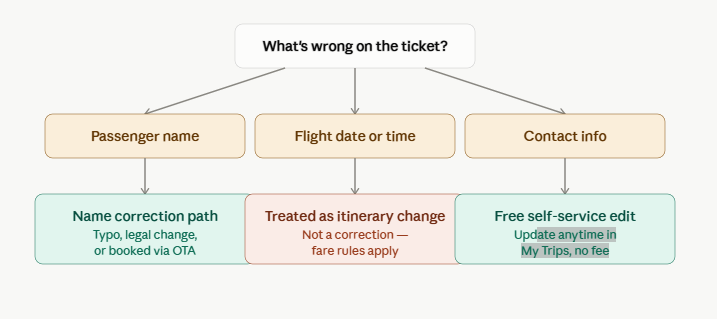
Contact info errors are the easy one. A wrong email or phone number doesn’t touch your name, your seat, or your fare. Log into My Trips, update it, done. No fee, no time pressure, no need to call anyone.
Flight date or time errors aren’t really “ticket info errors” at all. If you booked the wrong day by mistake, that’s a change request, not a correction — it falls under United’s standard fare rules rather than any name-correction process. If your ticket is still within United’s 24-hour booking window, you may be able to cancel and rebook without a fee.
Name errors are where most of the confusion lives, so that gets its own decision tree.
Fixing a name error, step by step
The first fork in the road isn’t “typo vs. legal name” — it’s where you booked.
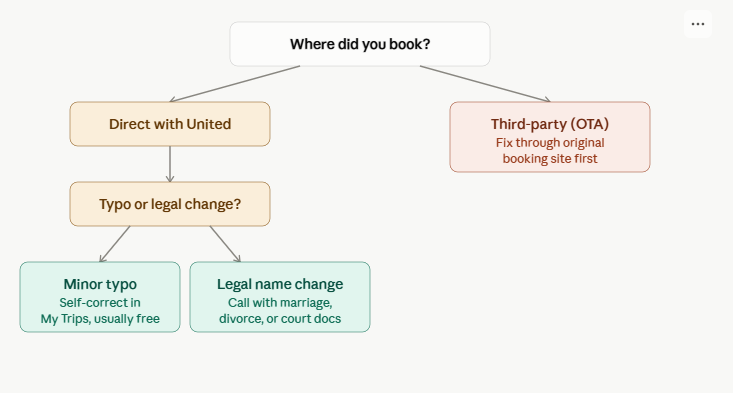
Here’s why booking source comes first: if you booked through Expedia, Google Flights, or a travel agent, United generally won’t touch the correction directly. The ticket record lives with the third-party platform, so that’s where the fix has to start. Skipping this step and calling United first is the single most common time-waster people run into.
If you booked directly with United, you’re choosing between two very different processes:
- A minor typo — a transposed letter, a dropped hyphen, a missing initial — is usually self-serviceable through My Trips, and typically processed without a fee.
- A legal name change needs documentation. A United Airlines ticket name change due to marriage, divorce, or a court order falls in this bucket. In some cases, United accepts a signed affidavit alongside a copy of your government ID if you don’t have the formal legal paperwork on hand yet.
What United won’t do, in either case, is transfer a ticket to a completely different person. That’s not a correction — it’s a new booking.
The name-matching rule that actually matters
Here’s the part almost every templated airline blog gets vague about, so let’s be precise: the standard isn’t set by United. It’s set by TSA’s Secure Flight program. TSA’s own guidance is direct — the name submitted on your airline reservation must be an exact match to the name you provided on your Secure Flight application or ID document, and in practice, minor formatting differences like a missing middle initial rarely cause a problem at the checkpoint. The safest move is still to book using the exact name on the photo ID you’ll present at security.
That single fact reframes the whole situation: fixing your ticket isn’t really about pleasing United — it’s about matching what TSA has on file. If you update your name with United but your MileagePlus profile or Secure Flight data is still out of sync, you can end up back at square one on your next trip.
Frequently overlooked restrictions
These are the details that rarely make it into the standard “how to fix your ticket” post, and they’re the ones that actually save you a headache:
- Basic Economy fares are the most restrictive. Many changes, including some name corrections, are harder or impossible to process on Basic Economy without canceling and rebooking at current pricing.
- The 24-hour window is a narrow lifeline, not a guarantee. If your ticket was booked within the last 24 hours and the flight is at least a week out, you may be able to cancel free and rebook clean — sidestepping the correction process altogether. Miss either condition and this option disappears.
- A corrected name doesn’t automatically update your MileagePlus profile, and a corrected MileagePlus profile doesn’t automatically update an already-issued ticket. Check both.
- Redress numbers and Known Traveler Numbers ride along with your name. If you’ve recently changed your legal name, your TSA PreCheck or Redress record needs a separate update — fixing the airline ticket alone won’t sync it.
Common mistakes — and how they turn into bigger problems
- Calling United first for an OTA booking. You’ll be redirected back to the platform you booked through, having lost time you didn’t need to lose.
- Booking with a nickname to “make it simple.” “Bill” instead of “William” feels harmless until it’s flagged at a checkpoint using a strict agent’s judgment call.
- Assuming a correction and a transfer are the same request. Asking an agent to “put my sister’s name on this ticket” isn’t a correction — it’s asking for something the airline doesn’t do, and the call will end without a resolution.
- Waiting to see if it “just works.” Small mismatches often do get through security. But betting your travel day on that is a bad trade for a five-minute phone call in advance.
A warning worth its own section
While researching this piece, nearly every top search result for the United Airlines name correction policy was the same kind of page: generic-sounding “official policy” sites plastered with third-party phone numbers, some hosted on hijacked university and government web pages. These aren’t United customer service — they’re lead-generation or scam operations riding on airline search traffic. United’s own contact channels live at united.com and inside the Fly United app. If a phone number for “airline name correction” turns up from a random search result rather than united.com directly, treat it as suspicious by default.
That’s not a throwaway warning — it’s genuinely the most useful thing I can tell you if you’re about to search this yourself.
Your fix-it checklist
- Identify the error type: name, date, or contact info — each has a different path
- If booked through an OTA, start the correction there, not with United
- Confirm whether it’s a minor typo or a legal name change
- Have supporting documents ready before you call, if it’s a legal change
- Check that your MileagePlus profile matches your corrected ticket
- Update any TSA Redress Number or Known Traveler Number separately, if relevant
- Only use contact info listed directly on united.com
A wrong detail on your ticket is rarely a crisis. It’s a sorting problem — figure out which category your error falls into, and the right fix is usually a short one.