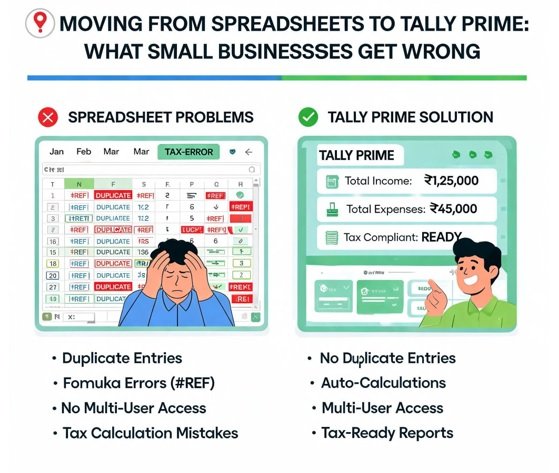
There’s a moment in the life of most growing businesses when the spreadsheet stops being enough. For a while, a well-built Excel file does the job — you track income, log expenses, tot up the month. Then the transaction volume climbs, a second person needs access, tax requirements get more demanding, and the spreadsheet that once felt liberating starts to feel like a liability. That’s usually when Tally Prime enters the picture.
Making the switch is the right call. But plenty of businesses stumble during the transition, and the stumbles are almost always avoidable. Having watched a lot of these migrations up close, the mistakes fall into a handful of predictable patterns. Here’s what trips people up, and how to move from spreadsheets to Tally without importing a mess into your shiny new system.
Why Businesses Outgrow Spreadsheets
Spreadsheets are brilliant until they aren’t. The trouble is that they scale badly in exactly the ways a growing business needs.
They have no real audit trail — anyone can change any cell, and there’s no record of who did what. They break silently, a single wrong formula quietly corrupting a total nobody notices for months. They struggle with multiple users, version chaos setting in the moment two people touch the same file. And they weren’t built for compliance — GST, structured reporting, and proper ledgers are bolted on at best.
Tally solves all of that. It’s built for structured accounting, multi-user access, and Indian compliance out of the box. The catch is that Tally is only as good as the data you put into it — and this is where most transitions go wrong.
Mistake One: Importing Dirty Data
The single most common migration error is dragging years of spreadsheet mess into a clean new system. Businesses assume Tally will somehow tidy things up. It won’t. Tally faithfully stores whatever you feed it, errors included.
If your spreadsheets have inconsistent vendor names, miscategorized expenses, duplicate entries, or transactions that never reconciled against the bank, all of that follows you into Tally. Worse, it’s now embedded in your official accounting system rather than a scratch file you could quietly fix.
The fix is to clean before you migrate, not after. Reconcile your historical data against your bank statements first, so what enters Tally is verified. Which raises the question of where clean transaction data comes from in the first place.
Mistake Two: Rebuilding History by Hand
When businesses migrate, they often need to bring in historical transactions — the current year, sometimes more. The instinct is to have someone type it all in. This is slow, and it reintroduces the exact errors you were trying to escape.
There’s a smarter route. Your bank statements already contain the authoritative record of every transaction. Rather than rekeying them, you can convert bank statements to Excel automatically, pulling every line into clean, structured columns — date, description, debit, credit, balance — straight from the source PDF. Now you have accurate, reconcilable data to work from, instead of a hand-typed version riddled with the usual transposition and skipped-line errors.
That converted data becomes the backbone of your migration. It’s verified against the bank, it’s structured consistently, and it didn’t cost you an afternoon of typing to produce.
Mistake Three: Skipping the Ledger Structure
Tally’s power comes from its ledger and group structure — the way it organizes accounts so your reports actually mean something. Businesses migrating in a hurry often skip this, dumping everything into a few generic ledgers and losing the reporting granularity that made Tally worth adopting.
Take the time to set up your ledgers properly before you import. Map your recurring vendors, your expense categories, your income heads. Do it once, thoughtfully, and every future import slots into place. Rush it, and you’ll be re-sorting transactions for months.
Mistake Four: No Reconciliation After Import
Migration isn’t finished when the data is in Tally. It’s finished when the data in Tally matches reality. Too many businesses import their history, see rows appear, and assume the job is done.
Always reconcile after importing. Confirm that Tally’s balances match your bank statements’ closing balances for each period. If they agree, your migration is sound. If they don’t, you’ve caught the problem now — while it’s a migration issue — rather than at year-end when it’s an accounting crisis.
Doing It Right: A Clean Migration Path
Put the fixes together and a smooth transition looks like this:
Clean your source data first. Reconcile your existing records against your bank statements so you know what’s accurate before anything moves.
Extract transaction data from the source, not by retyping. Pull your bank statement history into structured data rather than rebuilding it by hand.
Set up your ledger structure thoughtfully. Map vendors, categories, and heads once, so imports are consistent from the start.
Import in an organized, period-by-period way. Bring data in cleanly rather than in one chaotic dump.
Reconcile everything after import. Match Tally’s balances to your statements before you call the migration done.
For ongoing work once you’re settled in Tally, the same principle applies month to month. Instead of typing each month’s transactions into vouchers, a bank statement PDF to Excel converter for Tally Prime can turn your statements into Tally-ready import files directly, keeping the accuracy you established during migration and saving the hours you’d otherwise spend on manual entry every single month.
Why the Extra Care Pays Off
A rushed migration feels faster in the moment and costs you for years. Dirty data in Tally means unreliable reports, painful audits, and a nagging distrust of your own numbers. A careful migration feels slower for a week or two and then quietly rewards you every month afterward with books you can actually trust.
There’s a compounding benefit as well. Once your Tally data is clean and your import workflow is established, growth stops threatening your accounting. New volume just flows through the same clean pipeline. Businesses that migrate carelessly find that scaling makes their books worse; businesses that migrate well find that their accounting quietly handles whatever growth throws at it.
The Bottom Line
Moving from spreadsheets to Tally Prime is a genuine upgrade — but only if you resist the temptation to rush it. The mistakes that hurt aren’t exotic. They’re the ordinary ones: importing dirty data, rebuilding history by hand, skipping the ledger structure, and forgetting to reconcile. Avoid those four, start from clean data verified against your bank statements, and you’ll land in Tally with books that are accurate from day one.
The businesses that make this transition well don’t just get a better accounting system. They get a clean foundation that makes every month afterward easier. Take the extra care up front, and Tally becomes exactly what it’s supposed to be — the tool that lets your accounting keep pace with your growth, instead of falling behind it.